
Skip to the content
FluentKey Blog | Make Language Learning Fun With Interactive VideosFluentKey Blog | Make Language Learning Fun With Interactive Videos
make listening fun
  • FAQ
  • Help
  • Blog
  • Jobs
  • About
    • Our Team
    • Privacy Policy
    • Terms of Service
  • Get Started
  • FAQ
  • Help
  • Blog
  • Jobs
  • About
    • Our Team
    • Privacy Policy
    • Terms of Service
  • Get Started

How Can We Help?

Editing or deleting a quiz

Created OnApril 17, 2020
Last Updated OnApril 24, 2020
byHugo Xiong
  • Main
  • Quizzes
  • Editing or deleting a quiz
< All Topics

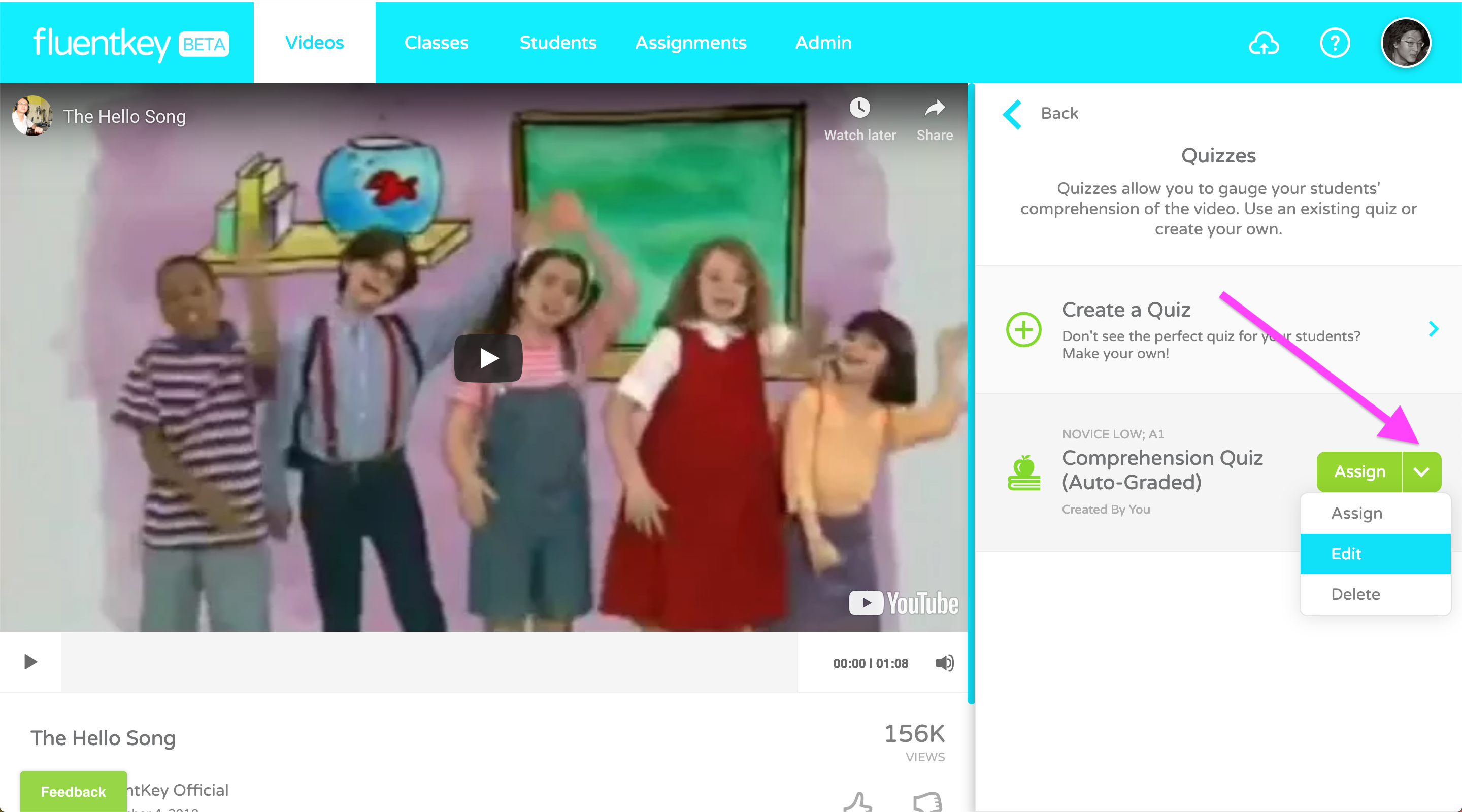
After you open up a video, click on “Browse Quizzes” in the right panel, then click on the arrow in the green button next to the quiz you want to edit or delete. You can only do this with quizzes you created yourself.
Previous Multiple attempts and redoing assignments
Next What types of quizzes are there?

© 2026 FluentKey Blog | Make Language Learning Fun With Interactive Videos

Powered by WordPress

To the top ↑ Up ↑